
Manage state in React
2024-04-11
- Introduction
- Props drilling
- The global state
- Context
- Reducers
- Meta frameworks
- State management via URL
- Conclusions
Introduction
If you have been developing web applications for a long time, you know that many jokes are made that a new Javascript framework comes out every day. And is it true? But what is most surprising is the number of libraries to manage state in React that often come out. To give as an example only the most popular:
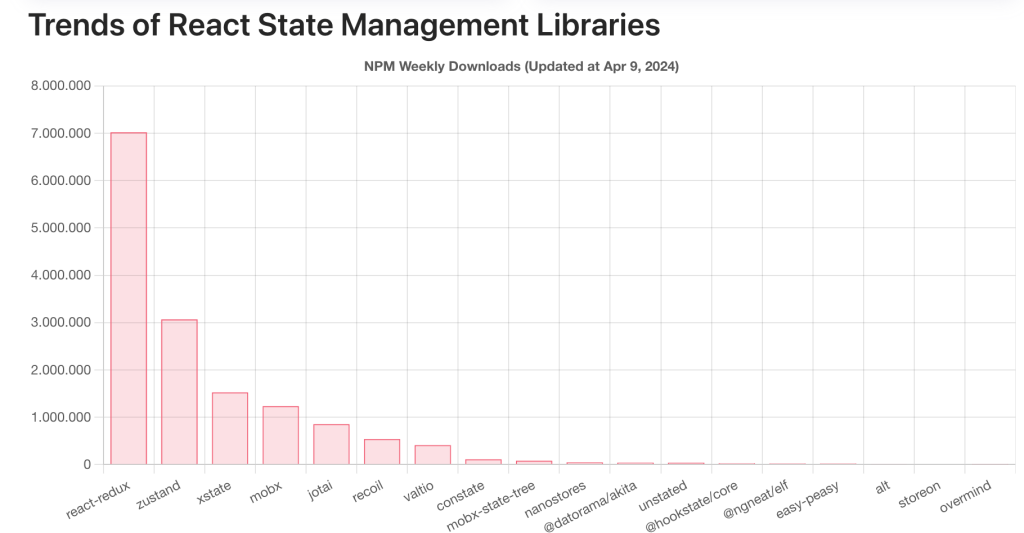
All state libraries can be divided into 3 large groups: based on reducers («reduced based»), atomic («atomic based») and oriented to mutating the state («mutable based»).
Libraries based on reducers use functions ("reducer") to change a global state. Users of these libraries have to send "messages" ("actions") to the reducer so that it changes a centralized state ("single source truth"). The most famous (and the most complex :=) is React-Redux. Zustand. has gained a lot of popularity lately.
“Atomic” libraries break down a global state into small pieces (“atoms”) that are accessible via React hooks. For example, Recoil or Jotai.
// atoms/counter.js
import { atom } from "recoil";

const counterAtom = atom({ key: "value", default: 0 });
export default counterAtom;

// index.js
import React from "react";
import ReactDOM from "react-dom";
import { RecoilRoot } from "recoil";
import App from "./App";

ReactDOM.render(<RecoilRoot> <App /> </RecoilRoot>,
document.getElementById("root"));

// App.js
import React from "react";
import { useRecoilState } from "recoil";
import counterAtom from "./atoms/counter";

const App = () => {
const [value, setValue] = useRecoilState(counterAtom);
return (<div>
           <button onClick={() => setValue(value + 1)}>Increment</button>
           <span>{value}</span>
           <button onClick={() => setValue(value - 1)}>Decrement</button>
        </div>); };
export default App;
An example of using Recoil
The "mutable" libraries provide us with an object ("proxy") that allows us to change state directly or subscribe to it. This is MobX and Valtio.
As we see, there are many ways to manage state in our React application.
But is it really necessary to use a library to manage the state of an application? If each component already has its own state, why do we need to create a global state?
Drilling props
Each component can have its own state and pass part of it to its children.
export default function Site({ username }) {
    return (<div><Article username={username}/></div>);
}
If we have many components within our application tree that share state, we will have to pass many props between different levels. Ultimately this situation may become unsustainable.
If we have the username in the state of the top component and we have to show it in a component 2 levels "below" we would have to pass it to all the "descendant" components.
export default function Site() {
  const { username, setUserName } = useState('')
  return (<Article>username={username}></Article>);
}

export default function Article({ username }) {
 return (<Paragraph>username={username}</Paragraph>);
}

export default function Paragraph({ username }) {
 return (<div><span>username</span></div>);
}
In a "real" application the state will be much more complex and we would have 3, 4 and 5 levels of components. The app code becomes too verbose. ?
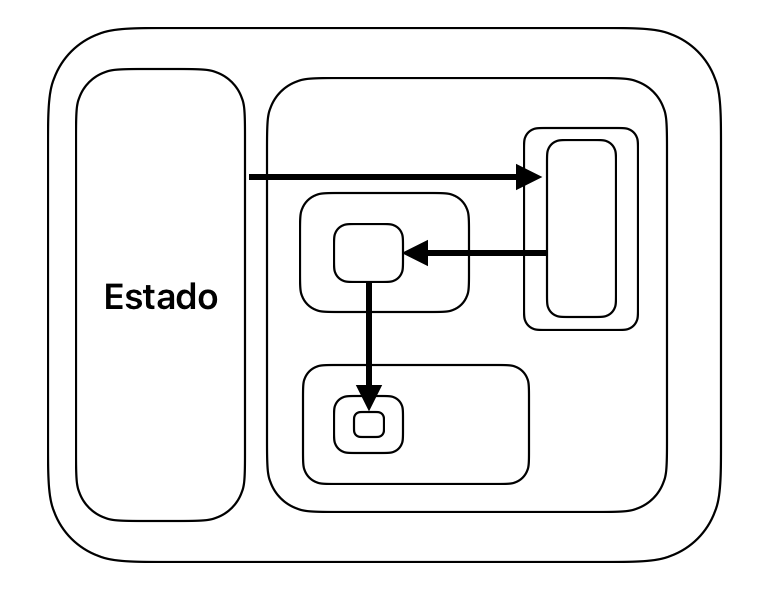
Our app may look like an “onion” with a lot of layers. In this case it may be difficult to share information between a parent and their "grandchildren" or "great-grandchildren." We would have to pass the same information between all intermediate levels.
A global state
The most obvious solution is to create a global state and share it among all components. This is what popular libraries like Redux or Zustand do. Using them it is quite easy to share state within any component. The state logic is also simplified by being a single site. It is a global warehouse where your data resides. Every time you need to update your data, you send an action ("a message") that goes to the "reduce" function. Depending on the type of action, the reducer updates the state immutably (returning).
The disadvantage of libraries of this type is their complexity. Even the creators of Redux recognized this and created a library – helper reduxjs/toolkit that simplifies the use of Redux.
// slices/counter.tsx

import { createSlice } from '@reduxjs/toolkit';
export const slice = createSlice({
               name:'counter',
               initialState: { value: 0 },
               reducers: {
                 increment: (state) => { state.value+=1 },
                 decrement: (state) => { state.value-=1 }},
                });

export const actions = slice.actions;
export const reducer = slice.reducer;

// store.tsx

import { configureStore } from '@reduxjs/toolkit';
import { reducer as counterReducer } from './slices/counter';

export const store = configureStore({reducer: { counter: counterReducer}});

export type CounterState = ReturnType<typeof store.getState>

// index.tsx
import React from 'react';
import ReactDOM from 'react-dom';
import { Provider } from 'react-redux';
import App from './App';

ReactDOM.createRoot(document.getElementById('root')!).render(
    <React.StrictMode>
     <Provider store={store}>
        <App/>
      </Provider>
    </React.StrictMode>
);

// App.tsx
import React from 'react';
import { useSelector, useDispatch } from 'react-redux';
import { actions } from './slices/counter';
import { store, CounterState }  from './store';
const App = () => {
const count = useSelector((state: CounterState) => state.counter.value);
const dispatch = useDispatch();
return (<div>
           <button onClick={() => dispatch(actions.increment())}>Increment</button>
           <span>{count}</span>
           <button onClick={() => dispatch(actions.decrement())}>Decrement</button>
        </div>)
};

export default App;
An example with '@reduxjs/toolkit'
As we see, even for a simple example we have to write a lot of code. Initialize a store, define a slice, etc. It is worth it if you have a state that has very complex internal logic and you need to capture it.
Context
One of the ways we can avoid prop drilling in React is through the ReactContext, it is a way to pass data between the component tree without having to manually pass the props at each level.
First we must create a context with React.createContext(). And then you can get the value using the useContext() hook.
const ThemeContext = React.createContext()

function MyPage() {
return (
   <ThemeContext.Provider value="dark">
    <Form />
  </ThemeContext.Provider>);
}

function Form() {
  const themeValue = useContext(ThemeContext)
  // ...we can use the themeValue value
}
This method can be used if "the context" of our application is quite simple and we do not need to pass a lot of information between different levels.
The reducers
One of the advantages of centralized libraries is «reducer«. It allows us to have all the state change logic in one place. In some way it "centralizes" our logic. So much so that the creators of React introduced a special hook that allows us to create the reducers without having to import third-party libraries. I'm talking about useReducer().
Summarizing its functionality, useReducer makes it easy for us to have our own reducer outside our component.
import { useReducer } from 'react';

function reducer(state, action) {
  if(action.type === 'INCREASE_MY_FORTUNE') {
    return { moneyAmount: state.moneyAmount + 1.0 }
  };
  throw Error('Unknown action.');
}

function MyComponent() {
  const [state, dispatch] = useReducer(reducer, { moneyAmount: 5000.0 });

  function handleClick() {
    dispatch({type: 'INCREASE_MY_FORTUNE'});
  }

  return (<div>
            <button onClick = {handleClick}>Increase muy fortune!!</button>
          </div>);
}
Using the useReducer hook we can launch the actions that change our state. It is a way of managing state very similar to Redux-type libraries but using the standard React hook. It could be an alternative for those who do not want to import external libraries.
Metaframeworks
The popularity of fullstack frameworks also makes state management easier. “Fullstack” frameworks allow us to separate the logic of our app into two parts: the “client” part and the “back” part. In the React world, the most famous “fullstack” framework is NextJs. This framework allows you to create the components that run on the server (Server Components). There is also the possibility of creating only some functions that are going to be executed on the server (Server Actions). By the way, here at Adictos we have the tutorials on Server Components and Server Actions where the concept of Server is explained in depth Components/ServerActions.
To create a Server Action simply put 'use server'.
//Server Action
'use server'

export async function fetchApi() {
   // ...
}
//Client Component
import { fetchApi } from '@/app/actions'

export function Button() {
   return (
     <button onClick={fetchApi}></button>
   )
}
That's why all the logic of the server calls will not affect your internal states of the components. A lot of logic can be taken outside of components that simplifies all state management. Many web applications have little logic that runs on "the client." For example, forms, drag-n-drop, switches, etc. But this type of logic depends on each component and does not need to be "globalized", because it does not affect other components. So the more logic there is in the "back-end" part, the simpler the "client" logic will be.
State management via URL
Plus you can always go back to the roots. Many times we can save the global state of our app simply using the URL and the query params. A URL can contain the required state in the form of a path and the query params string. Query params are particularly powerful since they are completely generic and customizable.
Thanks to the URLSearchParams API, it is possible to manipulate the query string without having to go back and forth to the server. This is a primitive on which we can build. As long as the URL limit is not exceeded (around 2000 characters), we are free to persist state in a URL.
In addition, React-Router has a hook useSearchParam that greatly simplifies all work with the URL.
import { useSearchParams } from "react-router-dom";

export function getProductId() {
  const [searchParams] = useSearchParams();
  const productId = searchParams.get("productId");
  return { productId };
}
Conclusions
It is true that in the world of React there are multitudes of libraries that help manage the state of our application. But before adding any third-party dependencies and increasing the app bundle, we have to think about whether it is really necessary.
If your app is going to have a complex state with many rules, it may be worth implementing the state logic with the help of heavy libraries like Redux.
But there are other simpler alternatives like *Zustand or Recoil.*Even the React library itself now has the hooks that make it easier for us to manage the state for most cases.